
We Are Multi-Cloud Now: LightUp.Cloud Adds Azure Blob Storage
From the first day we made one promise: your files are yours, and you can take them wherever you like. Until now that promise rested on S3, the most widely spoken language of cloud storage, understood by Amazon S3, MinIO, Ceph, Wasabi, Backblaze B2 and dozens of other services. Today we are extending it. LightUp.Cloud now works with Azure Blob Storage as well, which makes us multi-cloud in the most practical sense of the word: the same features and the same data layout on either side, and one setting to move between them.
The promise: no vendor lock-in
Vendor lock-in rarely arrives as a clause in a contract. It arrives as convenience: a proprietary format here, an undocumented feature there, an exit fee that makes leaving more expensive than staying. We have written before about the dangers of handing your data to a single cloud, and our answer has always been structural rather than rhetorical. The software is open source. Your files live in your storage account, not in a database that only we can read. And we build on open, widely used standards.
Supporting Azure is that promise applied to the second most common place where teams keep their data. If your company has standardised on Microsoft, if a customer contract names Azure, or if you simply want the leverage that comes from being able to walk away, you no longer have to give up LightUp.Cloud to do it.
What changed
Choosing where your files are stored is now a single setting in the server configuration: an S3-compatible service, as before, or Azure Blob Storage. If you change nothing, everything keeps working exactly as it did. If you pick Azure, everything else — uploads, downloads, thumbnails, version history, the recycle bin, sync, sharing, search — works the same way, because none of those features needs to know which cloud is underneath.
How it works
Every feature of LightUp.Cloud talks to your storage through one common layer. That layer takes care of the differences between providers, so the features above it never have to. Adding Azure meant teaching that layer a new language, not rebuilding the product.
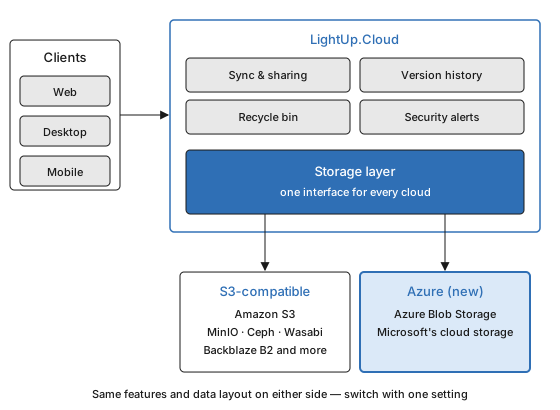
Everything above the storage layer is identical for both clouds; only the connection underneath changes.
There is one small difference worth knowing before you migrate: Azure has stricter naming rules for the containers that hold your files. Our naming already fits them, and the details are in the setup guide.
Moving between clouds
Because both storage types hold your files in the same layout, moving is conceptually simple: create the new storage, copy your files across with any standard copy tool, and change the setting so LightUp.Cloud points at the new location. Use a tool that preserves file metadata, and rehearse on a non-production copy first. We have not published an automated migration tool, so treat the first move as a small project, not a button.
That is the real test of "no lock-in": not that leaving can be described on paper, but that it needs nothing from us. No export request, no proprietary format, no permission.
Why this matters
Multi-cloud is not about running everywhere at once; it is about keeping your options open. A team can start on a server of its own, grow into a hosted S3 provider, and land on Azure when a customer requires it, without changing the way people work. Location still matters for speed — we explain how storage region affects sync performance — so choose the region closest to your people, whichever cloud it belongs to.
The setup guide, including the full list of Azure settings, comes with the open-source server. If you run into a corner we missed, tell us. A promise of no lock-in is only worth something if we keep proving it.