
Building a LAN Discovery Service for Light Upon Cloud: Concurrent C#, UDP Multicast and Kademlia
Light Upon Cloud (LUC) is a file-sharing application built for offices where people already push their machines hard — large design files, video, datasets, and the CPU and memory pressure that come with them. It is priced deliberately below alternatives such as Dropbox and is planned to be open source, which makes it interesting to both clients and the developers who want to learn from it.
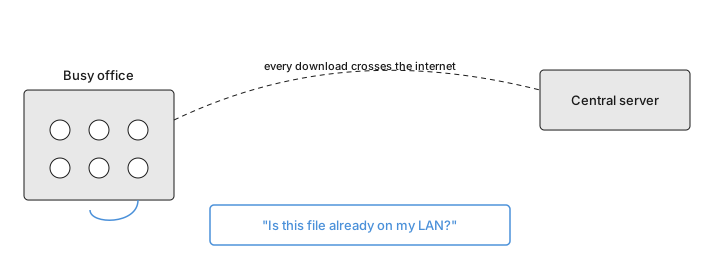
As LUC grew, one bottleneck kept surfacing. Every file download went through the central server, even when an identical copy already sat on a colleague's machine one desk away. In a quiet office nobody noticed; in a busy one the server took the full weight of traffic that never needed to leave the building, and transfers slowed for everyone. The Discovery Service (DS) grew out of that problem. Its guiding question is simple: before reaching out to the cloud, is this file already somewhere on my local network?
Consolidated information on concurrent C#, LAN discovery, and the Kademlia protocol is surprisingly hard to find, so we decided to share what we learned building it. If you have read how the local synchronization feature speeds up transfers, this article is the engineering story underneath it.
The Problem: A Server Bottleneck in Office File Sharing
LUC keeps everyone in a group — say, the design team or the accountants — in sync through a shared folder backed by a central server that holds every group's files. The model is easy to reason about, and it is the reason LUC chose object storage over traditional network filesystems, a decision explored in our notes on network and distributed filesystems. The weakness is not the storage layer; it is the path to it.
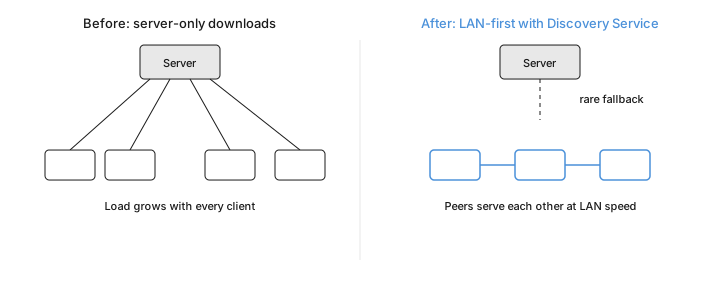
When ten people in the same office each download the same 88 MB asset, the server serves it ten times over the internet, and its load climbs with every additional client. In practice this shows up as an overload error or a transfer that simply drags. Yet the data is often already present on the LAN, sitting on a peer that could serve it at local-network speed. The Discovery Service exists to notice that opportunity and take it, falling back to the server only when the LAN genuinely cannot help. The stability principles behind that server tier are covered separately in how to design a stable storage system.
Design Goals and Architecture
The service was shaped by five requirements: discover LAN nodes only when needed, and do it safely and quickly; talk between any pair of nodes using the fewest possible threads; validate every message before answering it; refresh the map of known nodes efficiently; and download files fast while preserving their integrity. A survey of existing discovery projects turned up none that combined a reusable TCP connection pool with the specific download semantics LUC needed, so the service was built from those requirements up.
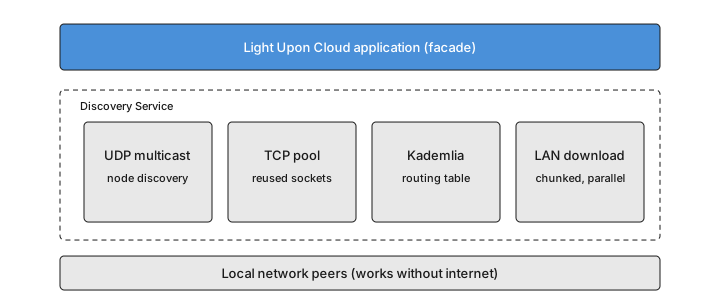
The first version targets Windows and .NET Framework 4.8, matching LUC itself, and was written in C# with Visual Studio 2022. Four building blocks sit beneath the application: UDP multicast for finding peers, a client-side TCP connection pool for fast and bounded communication, a Kademlia routing table for keeping the network map current, and a chunked downloader for pulling files from several peers at once. The whole design is event-driven — seven events, from "a new network interface appeared" to "the service stopped" — which keeps the pieces loosely coupled and, as a bonus, far easier to test.
Finding Peers: The UDP Multicast Approach
Discovery starts with UDP multicast rather than broadcast. Broadcast would announce the service's message format to every device on the network, including any attacker sitting on it; multicast delivers only to subscribers of a chosen group, which is both quieter and safer. The service uses the IPv4 group 239.255.0.251 and the IPv6 group FF02::D, and it listens on port 17500 — the same port Dropbox uses — with a working range of 17500 to 17510.
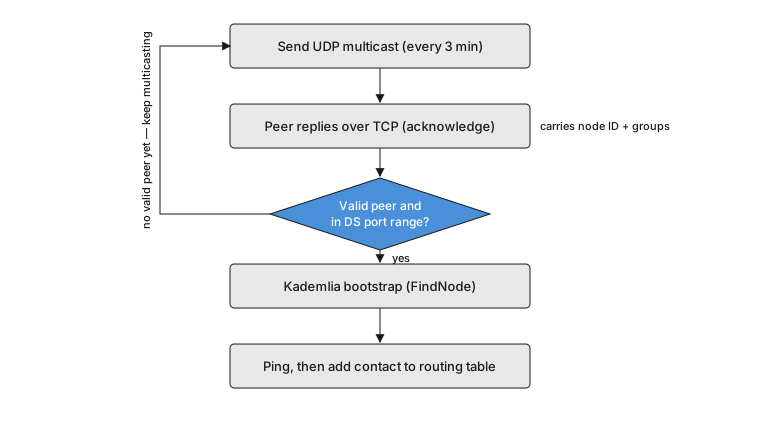
On startup the service sends a multicast message periodically — every three minutes in production, more often in debug builds — and keeps doing so until it has found at least one peer. A node that receives the multicast and passes validation replies over TCP with an acknowledgement that carries its own identity and the list of groups its user belongs to. The original sender then runs a Kademlia bootstrap against that peer; if it succeeds, the sender also pings the peer and adds it to its routing table. Because everything happens over the LAN, the whole exchange works with no internet connection at all.
Choosing which network interfaces to use is its own small problem. The service filters out loopback interfaces, which cannot carry LAN traffic, and asks Windows' IP Helper API which interface can actually reach a given address. It also rebinds to the operating system's network-change notifications, because in practice those events do not always fire — turning Wi-Fi off and on again without disabling the adapter can otherwise leave the service unaware that anything changed. This is the discovery machinery behind the user-facing LAN synchronization feature.
The TCP Connection Pool — Why and How
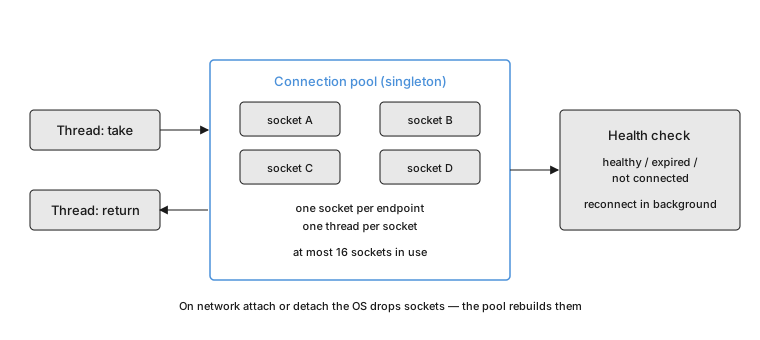
Establishing a TCP connection is not free, and the service opens many of them, so it caches client connections to remote peers in a connection pool. The idea is borrowed from database drivers — the design took cues from the pool in MySqlConnector (mysqlconnector.net) — but the rules here are tuned for a discovery service that must be a considerate guest on other people's machines.
Two rules keep the pool safe under heavy concurrency: at most one socket per remote endpoint, and at most one thread per socket. The second is the hard one, because if two threads ever read the same socket they can consume each other's data. A cap of sixteen sockets in use at once bounds the load the service places on itself and its peers — four are reserved for downloading a single file, the rest for answering multicasts and carrying Kademlia traffic. Every field in the pool is a concurrent type, and the class grew large enough that it is split across several files using C# partial classes.
A thread takes a socket, uses it, and returns it; on return the pool checks the socket's health — connected, expired, or not connected — and reconnects or discards it as needed. Networks change, and when a machine detaches from one the operating system quietly closes its sockets, so the pool resets and rebuilds connections in the background whenever an interface comes or goes. The sockets themselves are a custom type that adds cancellation, state tracking, and tunable timeouts on top of the built-in one — capabilities the framework's socket does not offer.
Keeping the Network Map Fresh with Kademlia
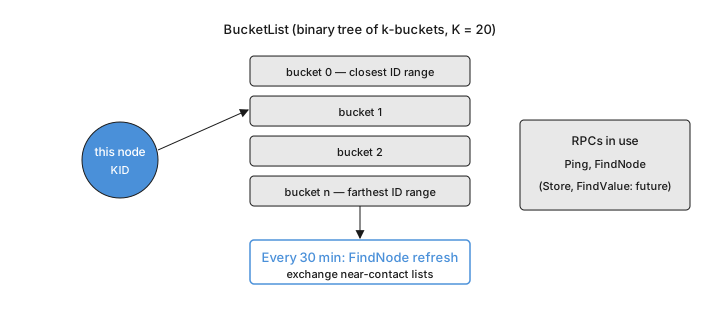
Once peers have found each other, the service needs to keep track of who is online without hammering the network. That is Kademlia's job. Kademlia is a well-established peer-to-peer routing scheme that stores contacts in an XOR-based address space; the service uses the Clifton.Kademlia implementation (Clifton.Kademlia on GitHub), chosen over the one alternative in C# because it is unusually readable and has a book written about it.
Each node has a 160-bit identifier and organizes the contacts it knows into buckets — up to twenty per bucket — held in a binary tree keyed by those identifiers. Every thirty minutes the service refreshes its buckets by asking each contact for the nodes near a random identifier, which quietly keeps the map current without any extra multicast traffic. Of Kademlia's four remote calls, the service leans on two — a liveness ping and a find-node lookup — and leaves the store and retrieve calls unused for now; they turn out to be a natural fit for future work.
Two adaptations were necessary. The reference implementation talked over HTTP to a dedicated server, which does not match a service that has its own UDP and TCP servers and its own connection pool, so that transport layer was replaced. And because an identifier that only lives for one session would cause a restarted machine to talk to itself and duplicate itself in other nodes' tables, each machine derives a stable identity from its processor and motherboard so it stays recognizable across restarts. Every request also carries a random identifier that the peer must echo back, a cheap way to confirm the other side actually speaks the protocol.
Downloading Files from the LAN
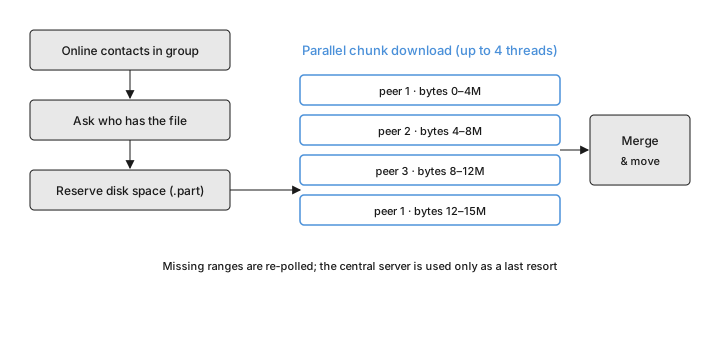
With peers discovered and tracked, downloading is where the payoff lands. The downloader treats a file as small or large depending on whether it fits in a single two-megabyte chunk. Either way it begins the same: gather the online contacts that belong to the file's group, then ask which of them actually hold the file, identifying it by an encoded path, its name, and the group — details that also tighten security.
Before writing anything the downloader checks that at least 100 MB of disk will remain free, then opens the target as a hidden file with a .part extension in a dedicated temporary folder, so a half-finished download is never mistaken for the real thing. It sets the file's length up front to reserve the space it will need. A small file is simply fetched from one contact after another until it arrives. A large file is marked sparse so bytes can be written to any offset, split into ranges assigned across contacts, and pulled in parallel with a cap of four threads; any ranges that fail to arrive are re-polled from other peers, and only then, as a last resort, does the service fall back to the server. When everything is present the file is un-hidden and moved into place.
The operation is careful about failure. Distinct outcomes — a missing argument, a cancellation, no peer holding the file, a partially downloaded file, or a filesystem error — are surfaced as distinct exceptions so the application can respond appropriately to each. This is what makes fast, safe transfers of the very large assets described in large file sharing practical inside a single office.
How Messages Are Validated and Dispatched
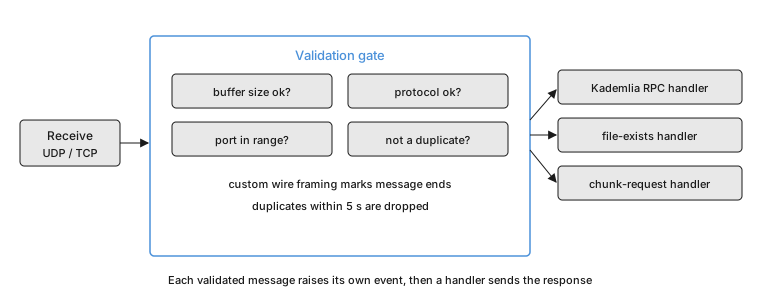
Because the service listens on an open network, it treats every inbound packet as suspect until proven otherwise. Four checks run before any message earns a response. The buffer must be a plausible size for its type. The bytes must conform to the service's binary protocol — read and written by a custom framing layer, because the built-in binary reader cannot tell where one message ends and the next begins, and the very first byte identifies the message type. The sender's port must fall inside the discovery range. And a message whose identifier was seen in the last five seconds is dropped, which blunts an attacker trying to flood nodes with duplicates without penalizing honest peers, who would practically never reuse an identifier that fast.
Only after those checks does the message reach a handler. UDP datagrams flow through a receive step to a multicast handler that raises a public event, which triggers a TCP acknowledgement — a socket borrowed from the pool and returned straight after. TCP messages are read from a session and routed to the handler that matches their type: one for Kademlia calls, one for "does this file exist here, at this size and version?", and one for chunk requests. Anyone embedding the service can attach their own handlers; they simply run after the built-in ones.
Integrating with Light Upon Cloud
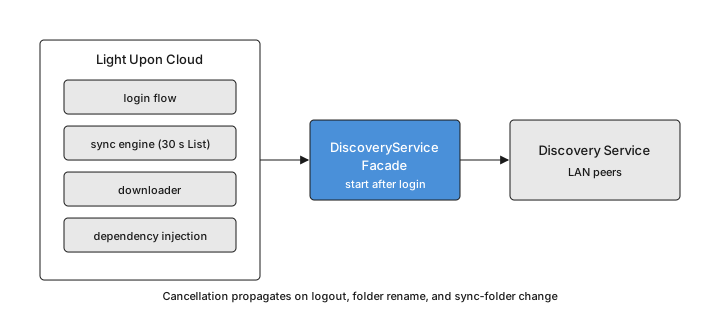
Wiring the service into LUC meant more than calling it from the download path. A facade hides the setup: the application initializes the service at startup through its dependency-injection container but does not start discovery yet, because a service that began multicasting before the user logged in would leak that user's group membership to every node on the network. Discovery begins only after login, and the routing table then refreshes itself through Kademlia rather than a burst of multicast. Cancellation threads through the whole thing — logging out, renaming a folder, or switching the sync folder all cancel in-flight downloads, as does the sync loop when it notices, on its thirty-second poll, that a file being downloaded has changed on the server.
Getting there surfaced a number of issues in LUC itself that were worth fixing along the way — from the installer and thread-safety to sync reconciliation and conflict handling — so the integration also hardened the host application it plugged into.
Lessons Learned and Future Work
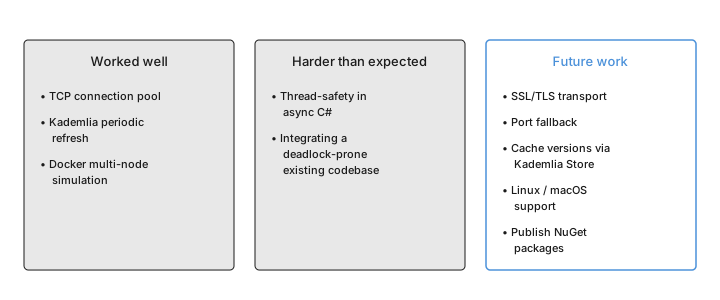
Three things worked better than expected. The TCP connection pool paid for its complexity, keeping communication fast while bounding the load on every machine. Kademlia's periodic refresh turned out to be the right tool for maintaining the network map cheaply, without the multicast chatter a naive approach would generate. And Docker Compose made it genuinely practical to simulate a multi-node network on one developer's machine.
Two things were harder. Thread-safety in asynchronous C# demanded constant care; the smallest amount of shared mutable state pulls in synchronization, and leaning on functional-style, immutable data simplified both correctness and speed. And integrating with an existing codebase that had deadlock-prone patterns meant fixing the host application before the new service could behave, which is why the integration chapter reads partly as a changelog for LUC.
The roadmap follows directly from the testing. An SSL/TLS transport comes first, both for security and to get past agents that block plain TCP. After that: falling back to another port when the preferred one cannot be used; requesting administrator rights only when a firewall rule is actually missing; using Kademlia's store and retrieve calls to cache file versions across a group so downloads start faster; trimming the remaining custom locks in favor of concurrent collections; a check that ignores messages from a peer claiming the local machine's own identity; support for running several instances; Linux and macOS support; and, ultimately, publishing the reusable pieces — the custom socket and the connection pool — as standalone packages, with the service itself fully abstracted from any one file-sharing application.
This article documents the project that integrated the Discovery Service into Light Upon Cloud. The source repository is available at the project's GitHub repository — link to be filled by the team.