
Beyond the Shoot: Footage, Sync and AI for Every Role Around the Camera
On a professional set, video-assist software captures, grades and reviews the camera feed in real time: instant playback, live grading and compositing, camera metadata straight from the SDI signal, a cloud that puts the video village on a phone. The best of it, QTAKE among them, is a tool crews trust, and we are not going to pretend otherwise.
But a film is not only the shoot day. Before the camera rolls, somebody writes the script, breaks it down, designs the characters, sets and props, boards the shots and plans the coverage. After the shoot, somebody has to keep thousands of clips findable, versioned and safe. Those jobs sit around a video-assist tool, and today they belong to a long list of specialists.
LightUp is built for that wider timeline, and it works with files from any camera, recorder or video-assist system. We follow the same professional conventions you already use on set — timecode, reel and clip names, proxies tied to originals, untouched camera files — and then we take the next step: we automate the work of the specialists around the shoot, from script analysis to VFX-style previs to quality control. And because a film is a team sport, we keep everyone's copy of the project in step with a sync layer that detects and resolves editing conflicts automatically, so two people can touch the same clip without anyone losing work. Here is how that compares with on-set video assist, with real numbers.
What On-Set Video Assist Does Best
We read the public documentation of QTAKE, a leading video-assist system, so that we describe this category fairly. What these tools do, they do on set, in real time, with capture hardware:
- Live capture and instant playback from SDI, NDI and other sources, with automatic recording triggered by the camera (ARRI and RED flags in the SDI stream, or run-timecode for other cameras).
- Camera metadata over SDI from ARRI, RED, Canon and Sony cameras, including the original camera media filename, so on-set files can be conformed to the camera originals.
- Real-time image work: CDL and 3D LUT grading, ACES, scopes and false colour, two-layer compositing with chroma keying, stereoscopic 3D, and a built-in editor for checking continuity.
- Streaming and sync: live monitoring for up to 160 simultaneous users, encrypted streams, forensic watermarking, offline-capable review apps, and automatic push to Moxion, ShotGrid or Pix.
- New AI for logging: the latest release adds on-device “Slate Scan” and “OSD Scan”, which read metadata from a physical slate or the camera's on-screen display.
If your question is “how do I capture, grade and review the camera feed on set?”, a video-assist system is a serious answer, and LightUp does not try to replace it.
Side by Side
| Capability | On-set video assist (QTAKE as the reference) | LightUp |
|---|---|---|
| Live SDI capture, multi-camera, instant playback | Core strength | Not our job. We start from the files your cameras and recorders produce |
| Live grading, scopes, compositing, 3D | Core strength | Not our job |
| Camera metadata | Read from the SDI signal on set (ARRI, RED, Canon, Sony) | Read from the files themselves after they land: timecode, reel, clip, scene, take, camera and lens tags. SDI ancillary data is on our roadmap, not shipped |
| Codecs | Captures the ProRes family, Apple Intermediate, DVCPRO HD and uncompressed; exports DNxHD/DNxHR to Avid; imports camera RAW | Reads ProRes (Proxy through 4444 XQ), DNxHD/DNxHR, H.264, HEVC and MXF; previews for any of them; camera RAW (R3D, BRAW) is stored and named, not decoded |
| Remote review and streaming | Live streams, Cloud Sync, forensic watermark, end-to-end encryption | Signed share links for files and folders, version history, audit log. No live camera streaming |
| Sync across the team | Independent playback and instant synchronization of clips, metadata and annotations for authorized crew, on the local network or through the cloud, working offline. How edit conflicts are handled is not described on its public pages | Background file sync on Windows, Android and iOS, with peer-to-peer transfer on the local network and block-level differential updates. Concurrent edits are detected with dotted version vectors and resolved automatically: both versions are kept, nothing is overwritten |
| Keeping the media safe | Project sync across the vendor's own apps | Checksummed chunked uploads, version history for more than 365 days with one-click rollback, file locks, recycle bin, audit trail, your own S3 or Azure storage |
| AI | Slate and on-screen-display scanning to log metadata (on device) | Script analysis, casting, design, storyboard, shot planning, previs clips, soundtrack, and AI quality checks |
| Creating the pre-production material | Reviews it: location scouting, casting sessions and costume fittings can be recorded and shared in the vendor's cloud | Generates it: script breakdown, characters, locations, props, storyboard, camera plan |
| What you run it on | A Mac plus a supported SDI capture card | A browser; desktop and mobile sync apps; your own storage |
| Price transparency | Licences and cloud credits are handled through a login-gated rental shop and dealers, so we cannot quote them | Published: plans from €16 a month for unlimited users, Studio Day Pass €29 once per project |
Video-assist information is taken from QTAKE's public sites (qtakehd.com, qtake.cloud) as published on 29 October 2026. QTAKE is a trademark of its owner; we are not affiliated with it.
The Short Version
On-set video assist captures the shoot; LightUp manages the project around it, whatever you shoot with. Many productions will want both: shoot and review with your video-assist system, then upload the QuickTime ProRes and proxy files to LightUp, where timecode, reel, clip and camera data are read automatically, proxies are matched to originals, and everything is versioned and shareable. And before the shoot, LightUp Studio produces the board, the cast and the shot plan you will carry to set.
Sync That Never Overwrites Your Work
On set the hard problem is capture. After the shoot it is concurrency: the editor, the colourist and the VFX artist all work in the same project folders, laptops go offline on trains and in edit suites, and somebody always saves over somebody else. LightUp keeps every device in sync in the background, and when two people change the same file it works out what happened by reasoning about causality, not by trusting file timestamps.
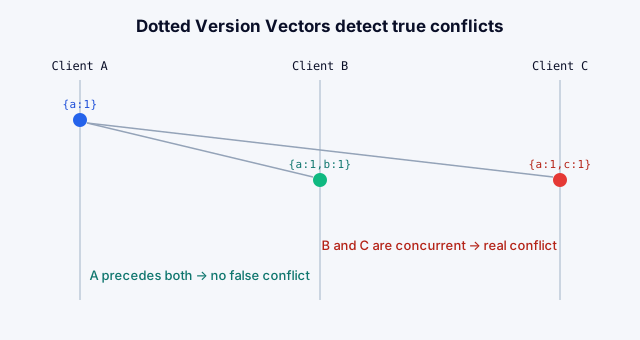
Automated Conflict Resolution with Dotted Version Vectors
Every file carries a dotted version vector that records which version each editor had seen when they saved. That is enough to tell two very different situations apart:
- Sequential edits. Your change was made on top of the latest version, so it simply becomes the new version. Nothing to resolve, no false alarm. (Plain timestamps and simple version vectors raise spurious conflicts here.)
- Concurrent edits. Someone else saved a newer version while you were editing the older one. This is a true conflict, and nobody has to notice it in time: the server keeps the newer version in place and stores yours beside it as
filename (Your Name, conflicted copy datetime).ext. Both versions survive, clearly labelled and with their authors, and the team decides which one wins.
Around that sit the safeguards video teams expect: file locks so the colourist can claim a project file while working, a recycle bin for accidental deletes, and a change history and rollback of more than 365 days. LightUp Studio projects use the same version tracking, and collaborators editing a script together see who is working on which shot, with soft locks preventing two people from overwriting the same one.
Sync at the Speed of Your Network, Not Your Internet Link
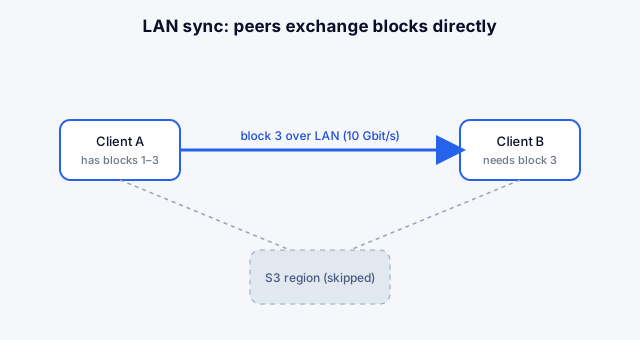
Camera files are big. Clients on the same local network discover each other and exchange data directly, and only the blocks that changed travel for an edited file. Over an internet link of 100 Mbit/s you can expect 7 to 10 MB/s; on a local network the line rate can reach 10 Gbit/s, about 1.2 GB/s. For a day's worth of dailies, 100 GB, that is the difference between roughly 2.8 hours and roughly 1.4 minutes at line rate. Real throughput depends on your disks and network, but the gap is why we sync locally first.
We Follow the Same Best Practices
Automation is only useful if it respects how professionals already work, so we built these conventions in rather than reinventing them:
- Camera naming and timecode. Reel, clip, scene and take are read from the container first and from camera naming conventions (ARRI, Canon, RED, Blackmagic, Sony, and
S12_T03-style slates) second. Drop-frame is preserved (01:00:00;00). Timecode read from the QuickTime track is cross-checked against a second source, and a disagreement is flagged instead of hidden. - Exact format identification. ProRes profiles (Proxy, LT, 422, 422 HQ, 4444, 4444 XQ), DNxHD and DNxHR classes, bit depth, chroma subsampling and exact frame rate (
24000/1001, not “23.98”). - Camera tags, not guesses. A real ARRI ALEXA ProRes file yields camera model, lens, EI, serial number and the camera clip name from the tags the camera wrote.
- Proxies tied to originals. Every generated preview is tagged as a proxy of its source, and uploaded proxies pair with their originals by a normalised clip key.
- Originals are never touched. Checksummed uploads, a version for every change, locks, a recycle bin and an audit trail.
- Conflicts resolved by causality. Dotted version vectors tell a true concurrent edit from an ordinary update, and a conflicting copy is kept next to the original instead of overwriting it.
- Honest metadata. Every value records where it came from. When only part of a file was read, anything that could be wrong (such as timecode) is left out rather than guessed.
- Cinematography rules in the planner. Screen direction and the 180° line, camera-rotation budgets, time-of-day and shadow continuity, and shot-length arithmetic are checked automatically — see the QA section below.
The Next Step: Automating the Specialists
This is where LightUp Studio is different from any video-assist product. Give it a script, a brief, a PDF or a handful of sketches, and it produces the preparation work that normally takes a team. Each row below is a job a person does today. Studio produces a first pass; the person stays in charge of the decisions.
| Role | What Studio automates | What stays human |
|---|---|---|
| Screenwriter / script doctor | Compiles your story into an ordered, shot-by-shot script that keeps your actions, camera and ending; splits the storyline into connected episodes | Voice, theme, final draft |
| Script supervisor / breakdown | Reads the script, PDF and sketches together and extracts the cast, locations and props | Production-specific exceptions |
| Casting and character designer | Identity card, personality and voice profile, a reference portrait and expression, body and turnaround sheets, so the same face and costume follow the character into every shot | Choosing the look; real casting |
| Production designer / props master | Location plates, prop art, object design; your own sketch can be bound as the authoritative plate | Physical build and sourcing |
| Concept and storyboard artist | Key art, beat stills and storyboard frames, with approval before anything is animated | Final art direction |
| Cinematographer (planning) | A shot-by-shot camera plan: moves, axis, lighting hour, shadow behaviour, timed phases for every clip | Taste and on-set decisions |
| VFX supervisor / previs artist | Previs clips with continuity from one clip to the next (the last frame of a clip can seed the next), designed transitions such as material and fog dissolves, orientation and rotation rules, and “anatomy guards” that stop extra hands and invented objects | Hero effects and final compositing |
| Music and sound supervisor | An original soundtrack composed to picture; voice sessions for characters | Final mix, composer, performance |
| DIT / data wrangler | Checksummed chunked ingest, format detection, a 480p preview and thumbnail for every video, including ProRes, DNx, MXF and HEVC | On-set media handling |
| Assistant editor / dailies coordinator | Timecode, reel, clip, scene, take, camera, lens and creation date logged automatically; originals matched to proxies | Selects and editorial judgement |
| Archivist / asset manager | Versioning, locks, recycle bin, audit log, signed sharing, multi-project buckets, and automatic conflict resolution when two people edit the same file | Retention policy |
And Quality Control, Automated Too
Generated material is only useful if you can trust it, so QA is built in at several points rather than bolted on:
- The supervising editor. A second pass proof-reads the cinematographer's plan against more than a dozen checks: axis flip-flops and the 180° line, over-spent camera rotation, timecode arithmetic that does not add up, actions too short to perform, lighting drift, broken continuity chains between clips, vague actions, and missing safeguards against extra limbs. It then returns the corrected plan, not just a list of complaints.
- The continuity supervisor. Inspects a rendered frame and reports only what it can actually see. A separate check decides whether a suspected contradiction between shot descriptions is real before you are asked to act on it.
- The drawing checker. Acts as script supervisor: it matches a storyboard drawing to the characters, props and places of the shot it illustrates before the drawing feeds the rest of the pipeline.
- The gate before the spend. Video generation is blocked until the plan and the key frames are approved, and the number of images and clips to be generated is shown before anything is spent.
- Media QA. Timecode from two independent sources is compared and mismatches are flagged; truncated or unreadable files are recorded as such instead of failing silently.
The Numbers
We would rather show you figures than adjectives. First, what we have measured.
| Measured or calculated | Result |
|---|---|
| Cost of one finished minute of 1080p video | $10 to $18, passed through at the generation provider's rates |
| A complete 44-second film: 14 clips, about 21 generated stills, about 24 reference images | $9.73 at list rates ($0.607 per clip, $0.0473 per still, $0.0098 per reference image), about $13 per finished minute |
| Re-rolling one clip you don't like | About 61 cents; one still, about 5 cents |
| Access to Studio for one project | €29 once; no subscription |
| Render time | About 14 minutes per finished minute for clip generation; 25 to 30 when every keyframe is also generated and checked. For the 44-second film: roughly 10 to 22 minutes |
| Planning steps (script analysis, shot plan, plan review) | Typically 30 to 120 seconds each |
| Moving 100 GB of dailies | About 2.8 hours over a 100 Mbit/s internet link (7 to 10 MB/s); about 1.4 minutes on a 10 Gbit/s local network (about 1.2 GB/s), both at line rate and best case |
| Two people save the same file | Detected automatically; both versions kept, the second labelled (Name, conflicted copy datetime); history and rollback for more than 365 days |
| Metadata from a 412 MB ARRI ALEXA ProRes 4444 XQ clip | Read 15 MB (about 4%) of the file: timecode 08:38:38:12, reel, clip, creation date and camera tags |
| Metadata from a 100 MB ProRes 422 HQ clip with drop-frame timecode | Ready about 2 seconds after the upload finished, from 10% of the bytes |
| A test set of 34 camera-style files (ProRes, DNxHD/DNxHR, H.264, HEVC, MXF, RAW, truncated) | 30 got full technical records; 4 were recorded as “basic” for stated reasons (camera RAW, a truncated file, an undecodable file, an MXF with no readable video) |
Second, an illustrative estimate of what that replaces. We do not have customer data yet, so the human-hours below are planning assumptions, shown in full so you can replace them with your own rates. Take a 44-second, 14-shot short with 5 characters and 6 locations:
| Task (assumed hours) | Lean team | Typical team |
|---|---|---|
| Script breakdown: cast, locations, props | 1.5 h | 3 h |
| Character design (5 characters) | 7.5 h | 15 h |
| Location and prop design (6 locations) | 8 h | 16 h |
| Storyboard (14 shots) | 10.5 h | 21 h |
| Shot and camera planning | 3.5 h | 7 h |
| Previs / animatic (14 clips) | 14 h | 28 h |
| Continuity and QA passes | 3 h | 6 h |
| Specialist time | 48 h | 96 h |
| Traditional first pass | With LightUp Studio | |
|---|---|---|
| People's time | 48 to 96 hours | About 5 to 8 hours of review and approval (assumed 20 to 35 minutes per shot) |
| Hours saved | — | About 40 to 90 hours |
| Machine time | — | Roughly 10 to 22 minutes of rendering plus the planning steps |
| Out-of-pocket cost at an illustrative blended €60 an hour | €2,880 to €5,760 | €29 + about €9 of compute + your own 5 to 8 review hours (€300 to €480), about €340 to €520 all in |
| Turnaround for a first complete pass | Days to weeks, depending on how many people are available | A working day, most of it spent reviewing |
Cost and render-time figures are measured from our pipeline and the provider's published rates; euro amounts use $1.08 to the euro. The human-hours, the €60 rate and the review time are assumptions for illustration, not customer results. Every regenerated clip adds its own cost, and the first pass is a draft that a person still approves.
What This Does Not Replace
We would rather say this plainly. Studio produces drafts and previs, and it works best when someone with taste reviews every step. It does not replace your DP's eye, your director's decisions, an editor's judgement or the last mile of VFX. It removes the blank page and the repetitive checking so that your specialists spend their hours on the decisions only they can make. Live multi-camera capture, on-set grading and compositing remain the territory of on-set video assist, and if you use it, keep using it.
Try It on Your Own Material
Bring a script, a brief or a camera clip. Upload a ProRes, DNx or H.264 file and see its timecode, reel, clip and camera data appear within seconds. Open Studio, create a world from your script, and see the cast, the shot plan and the quality check before you commit to anything. LightUp starts at €16 a month for unlimited users, with storage on your own S3 or Azure account. Studio is a €29 Day Pass for a single project, plus the generation compute at cost.
Buy a Studio Day Pass and start your project, or open a workspace and upload your first clip.